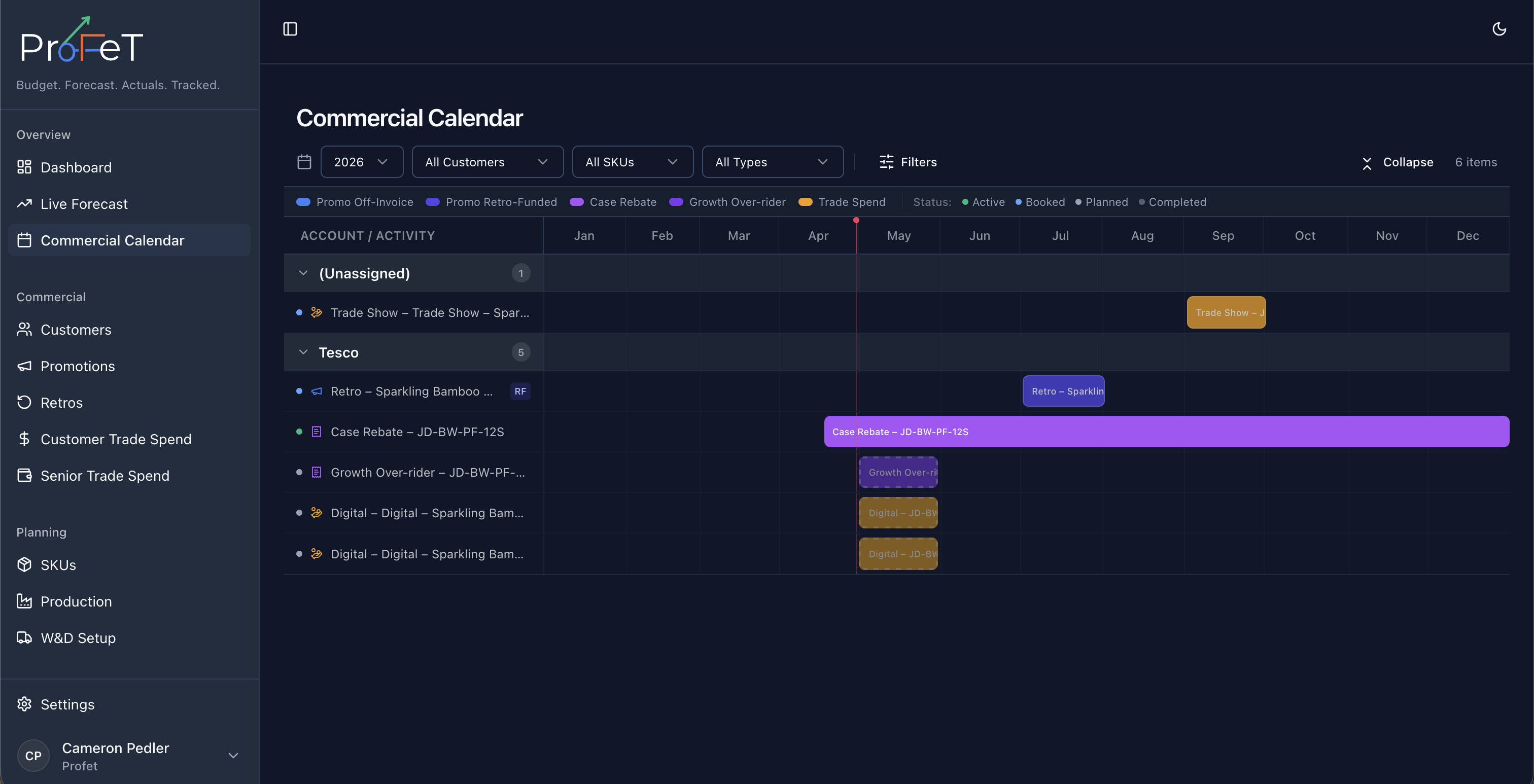
Commercial Calendar
A unified timeline of all promotions, retros, and trade spend activity.
The Commercial Calendar is your planning timeline for commercial activity. Use it to see what is running, what is overlapping, and what needs attention before committing new activity.
Start Here
Open Commercial Calendar when you want a quick answer to:
- What is live right now?
- What is booked next?
- Where are we overloaded or under-supported?
The page brings together all commercial records as colour-coded timeline bars.
What You See
The timeline includes:
| Activity Type | What’s Included |
|---|---|
| Promotions | Off-invoice and retro-funded promotional deals |
| Retros | Case rebates, growth overriders, and listing fees |
| Trade Spend | Marketing, sampling, and other promotional spend |
Each bar spans the activity date range, so overlaps and gaps are visible immediately.
Read the Status Quickly
Activities are colour-coded by status:
| Status | Meaning |
|---|---|
| Planned | Set up but not yet committed (before start date, not booked) |
| Booked | Confirmed and committed in the system |
| Active | Currently running (today falls within the date range) |
| Completed | Past the end date |
Status is calculated automatically from dates and booking flags.
Step 1: Filter to the Question
Use the filter bar to focus the calendar:
- Status — Show only Planned, Booked, Active, or Completed activities
- Type — Filter to Promotions, Retros, or Trade Spend only
- Customer — Focus on a single customer’s activity
- SKU — See all activity for a specific product
- Category — Filter by SKU category
Step 2: Navigate the Timeline
- Use month labels along the top to orient yourself in the year
- Navigate between years to review historical or future plans
- Click any bar to open the activity’s detail view for editing
Step 3: Take Action from What You Find
Commercial Calendar is a planning and coordination view. It reads from:
To create or edit records, open the relevant source feature from the detail view.
Common use cases:
- Planning meetings — Review the commercial plan with your team, spotting gaps or overlaps
- Capacity check — See how many promotions are running simultaneously
- Customer review — Filter to a single customer to review their full commercial programme
- Seasonal planning — Visualise how promotional activity aligns with demand seasonality
Commercial Calendar Screens